Cesky: |
PicoLibSDK
Alternative Extended C/C++ SDK library for Raspberry Pico, RP2040 and RP2350
Version 2.09, May 2025
(c) Miroslav Nemecek
https://github.com/Panda381/PicoLibSDK
>>> Downloads - Links <<<
Picopad on pajenicko.cz - SALES
Picopad Song: YouTube ... video ... mp3 ... Lyrics

Contents:
PicoLibSDK is an alternative
extended C/C++ SDK library for the Raspberry Pico module with the
RP2040 processor, with easy compilation under Windows. It can
also be used for other modules which use this processor. Compared
to the original SDK library, the PicoLibSDK library tries to
extend the functionality of the original library and especially
to make the SDK library easier to use.
Boot Loader: Boot loader allowing to select and run UF2 programs from SD card.
SDK hardware control: ADC, boot ROM, system clocks control, CPU control, hardware divider, DMA, doorbells, double and float arithmetics, FIFO mailboxes, flash programming, GPIO, HSTX, I2C, hardware interpolator, IRQ, multicore, PIO, PLL, PSRAM, PWM, QSPI, reset and power control, ROSC, RTC, SHA256, SPI, spinlocks, SysTick, alarm timer, TMDS, TRNG, watchdog, XOSC. The RP2350 processor can be used in ARM or RISC-V mode.
Tool library: alarm, 32-bit Unix calendar, long 64-bit astronomic calendar, canvas drawing, RGBA color vector, CRC check with DMA support, decode numbers, emulators, escape packet protocol, event ring buffer, FAT file system, doubly linked list, memory allocator, 2D transformation matrix, mini-ring buffer, formatted print, PWM sound output, random generator, rectangle, ring buffer, DMA ring buffer, SD card, streams, text strings, text list, text print, tree list, VGA drawing, video player, MP3 player.
USB library: multiplayer mini-port, CDC device and host - serial communication, HID device and host - including external keyboard and mouse.
Big intergers: calculations with large integers, calculation of Bernoulli numbers.
Real numbers: calculations with floating-point numbers with optional precision up to 3690 digits and 30-bit exponent. Scientific functions with optional calculation method - Ln, Exp, Sqrt, Sin, Cos, Tan, arcus, hyperbolic functions and many more. Linear factorials with accurate and fast calculation.
Display drivers: Prepared support of TFT, DVI and VGA display.
Devices: Support of boards Picoino/PicoinoMini/Picotron/DemoVGA/PicoPadVGA with VGA display, PicoPad with TFT display and basic Raspberry Pico without additional hardware.
Compatibility: The library is backwards compatible with the original SDK library in most functions. Most functions can be called from the original SDK library, although internally they are often handled differently.
Boot loader for running programs from the SD card:

The library source code is,
with a few exceptions, completely free to use for any purpose,
including commercial use. It is possible to use and modify most
or parts of the library source code without restriction. The only
exceptions are the single- and double-floating-point mathematics
libraries, which are mostly the copyrighted work of Raspberry Pi
and Mark Owen and are therefore subject to the licensing terms of
the original authors.
Download PicoLibSDK library (source codes, images of SD card, sample programs)
>>> SD card contents for PicoPad 1 <<<
>>> SD card contents for PicoPad 2 in ARM mode <<<
>>> SD card contents for PicoPad 2 in RISC-V mode <<<
>>> SD card contents for PicoPadHSTX in ARM mode <<<
>>> SD card contents for PicoPadHSTX in RISC-V mode <<<
Download manual for PicoLibSDK library (formats DOC, ODT, PDF)
PicoLibSDK on Github: https://github.com/Panda381/PicoLibSDK
Video with slide-show player to compare videomodes of PicoLibSDK
SD card contents for PicoPadVGA
SD card contents for board DemoVGA
SD card contents for PicoinoMini
Sample programs for Raspberry Pico 1
Sample programs for Raspberry Pico 2 in ARM mode
Sample programs for Raspberry Pico 2 in RISC-V mode
Picopad Song: YouTube ... video ... mp3 ... Lyrics
Target Devices
The main target device, for which the library is currently prepared, is the PicoPad console, with a 16-bit 320x240 pixel TFT display, 8 buttons and a microSD card. Most programs and games on the PicoPad can also be controlled from the USB keyboard, which is connected to the Pico's USB connector via a power splitter that also provides an external +5V power supply. Key mapping: A->Ctrl, B->Alt, X->Shift, Y->Esc.
PicoPad 1.0 schematic diagram (or as PDF):

PicoPad 0.8
A compilation is also ready for PicoPad version 0.8, which was the first PicoPad prototype. The compilation serves more as a demonstration of the possibility of an alternative configuration of the compilation.

PicoPad 0.8 schematic diagram (or as PDF):

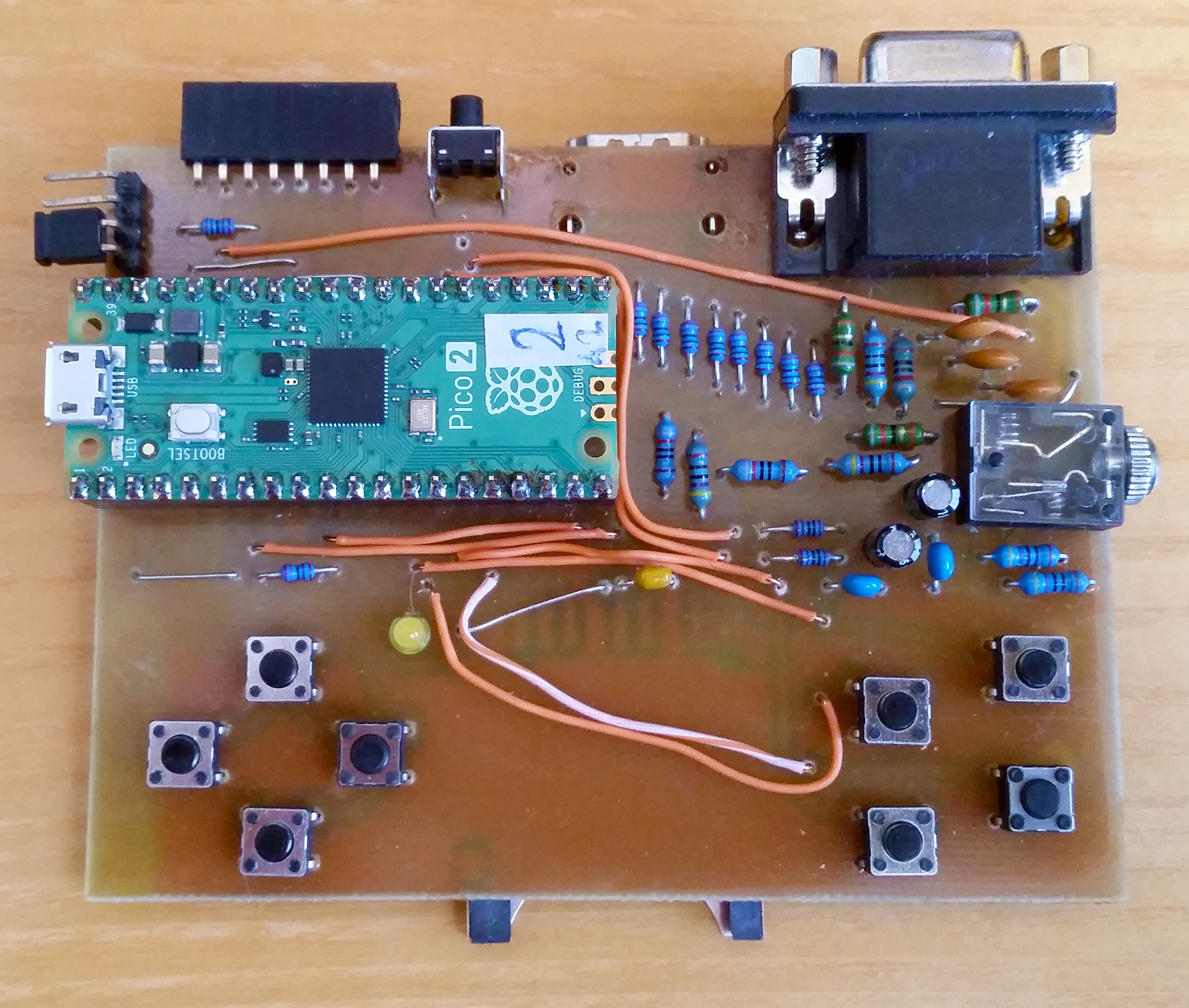
PicoPadHSTX is an alternative to the PicoPad console with VGA and DVI (HDMI) display output, RP2350 processor and stereo sound. It is usually used in 320x240 pixel resolution with 16-bit RGB565 color format. Most programs and games on the PicoPadHSTX can also be controlled using the USB keyboard. The PicoPadHSTX must be powered from an external +5V power supply via the USB connector. Key mapping: A->Ctrl, B->Alt, X->Shift, Y->Esc. All PicoPad programs are available for the PicoPadHSTX, including more than 2000 games for GameBoy and NES console. You can find ready-made games for GameBoy and NES on servers webshare and datoid. ... Download sources for PicoPadHSTX ... Download SD card for PicoPadHSTX in ARM mode ... Download SD card for PicoPadHSTX in RISC-V mode
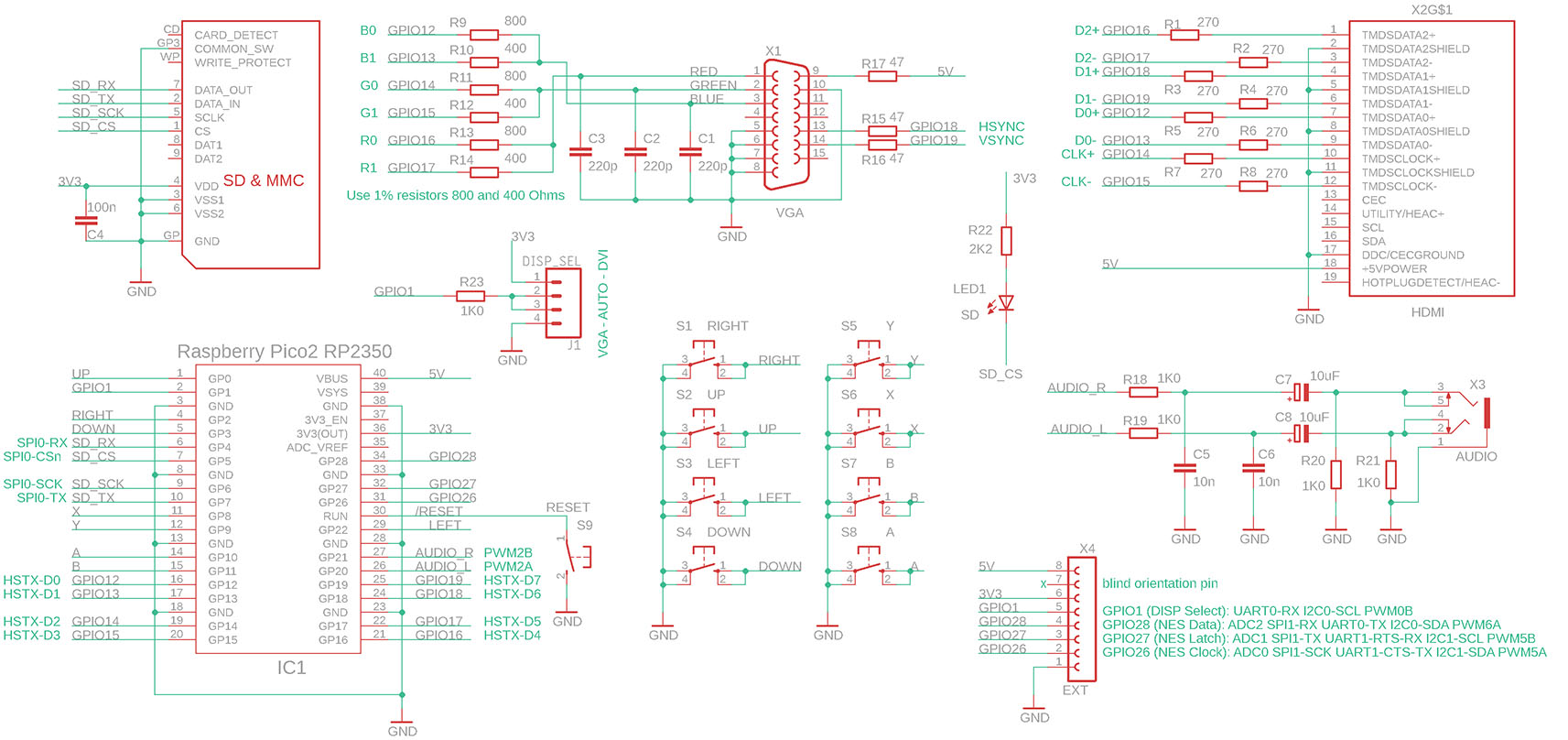
PicoPadHSTX schematic diagram:
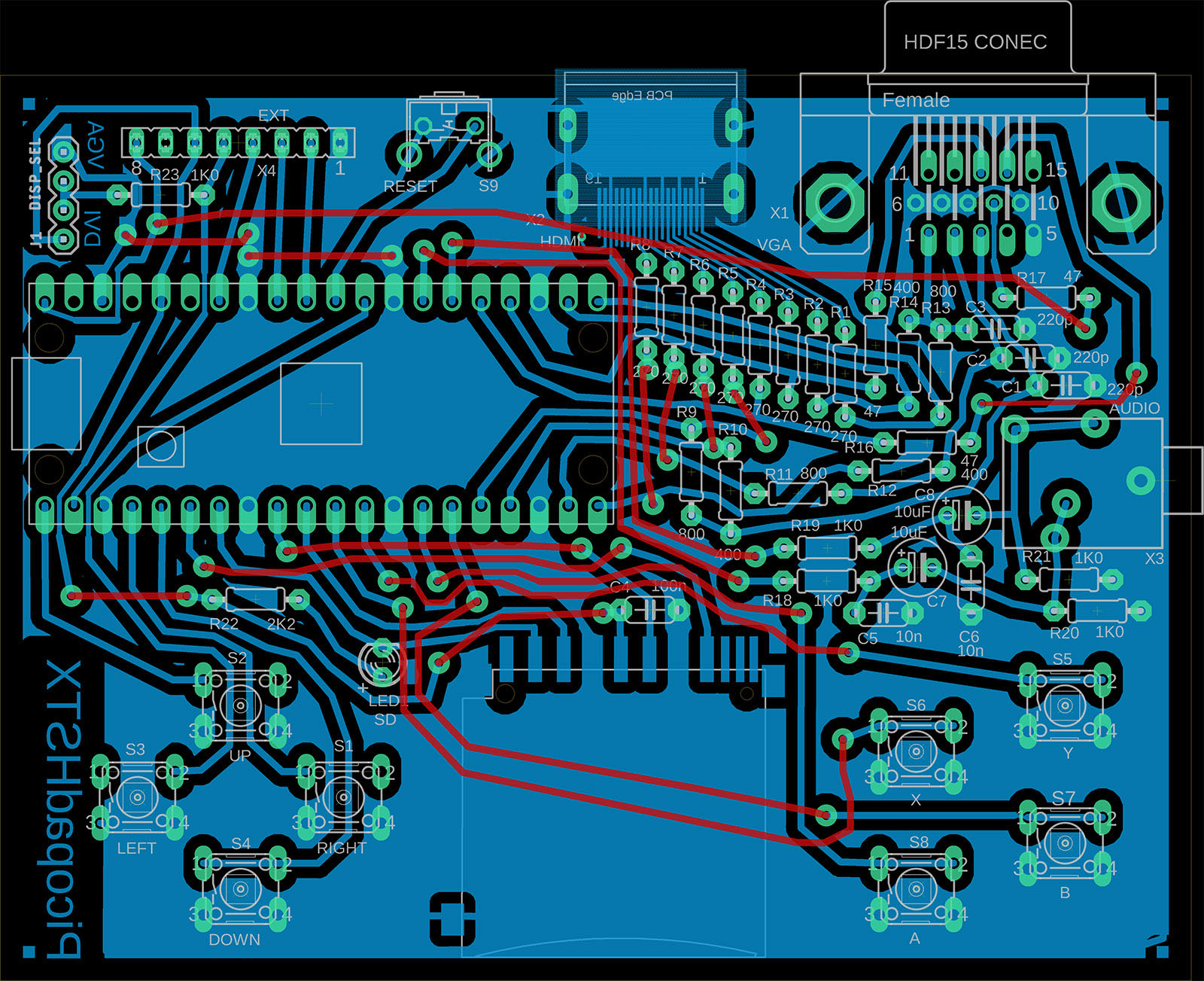
PicoPadHSTX component fitting:
PicoPadVGA is an alternative to the PicoPad console with VGA display output. It is typically used in 320x240 pixel resolution with a 16-bit RGB565 color format. A 400x300 pixel resolution is also supported. Most programs and games on the PicoPadVGA can also be controlled from the USB keyboard. PicoPadVGA must be powered from an external +5V power supply via power USB connector. Key mapping: A->Ctrl, B->Alt, X->Shift, Y->Esc. Download sources for PicoPadVGA

PicoPadVGA schematic diagram:

PicoPadVGA component fitting:

Another prepared compilation alternative is the Picoino, a predecessor to the PicoPad, with a built-in 56-button keyboard and output to a VGA monitor in 8-bit RGB332 color mode. The library is prepared with 320x240 image resolution. Together with the PicoVGA library, higher resolutions and combined modes are possible. Download sources for Picoino.
Sample programs for Picoino are prepared by adapting programs for PicoPad - graphics changed from 16-bit to 8-bit and 8 keyboard buttons mapped to PicoPad codes (cursors, Space -> A, Z -> B, Ctrl ->X, BackSpace -> Y) are used for control.

Picoino 1.0 schematic diagram:

Picoino 1.0 component fitting:

Picoino 1.0 output to VGA monitor:

As the smaller brother of the PicoPad, a lightweight version of the Picoino was created, which has 8-bit RGB332 output to a VGA display (QVGA 320x240 mode), an SD card, an external connector like the PicoPad and 8 buttons like the PicoPad. It is mainly intended for Raspberry Pico programming tutorials, as it allows easy assembly from common household supplies - 3 resistors and a VGA connector can be enough for output to a VGA monitor. Download sources for PicoinoMini.

PicoinoMini schematic diagram:

PicoinoMini component fitting:

PicoinoMini output to VGA monitor:

DemoVGA is a demo module with output to a VGA monitor in 320x240 pixel resolution, 16-bit RGB565 color format. Includes SD card, additional USB power connector, headphone output and 3 buttons. An external USB keyboard is used for some programs (typically games). Download sources for DemoVGA.

DemoVGA schematic diagram:

DemoVGA component fitting:

Picotron is a simple minicomputer focused on technical applications. It has an output to a VGA display with a resolution of up to 800x600 pixels, 4-bit color output in YRGB1111 mode (16-color mode as in PC-CGA and EGA). It also has an SD card, headphone audio jack and a keyboard of 40 micro-switches. Download sources for Picotron.

Picotron schematic diagram:

Picotron component fitting:

Raspberry Pico
The library is also ready for the basic Raspberry Pico module, without additional hardware. This is mainly used to test basic tutorials for the Raspberry Pico.

The library has 56 sample programs and games. SD card images are prepared for each target device. Before using the SD card, you need to load the boot loader into the processor - this is possible either by loading the LOADER.UF2 program from the root folder of the SD card image, or by loading any other program, as each program contains a boot loader at the same time. The programs can be exited by pressing the Y button and going to the boot loader.

Config - Setup PicoPad configuration. Sets volume, display backlight, ADC reference voltage, battery measurement voltage, temperature measurement calibration, crystal frequency calibration..

SD-card boot loader - the program is loaded into RAM memory and allows writing a new boot3 loader from the SD card to flash memory (possibly with the application). But it also saves the flash memory contents to a UF2 file without modifying the flash memory contents by running this program.

Frequency generator - Generates a rectangular signal or PWM signal (sine, sawtooth, triangle - sample rate 100 kHz), frequency range from 0.01 Hz to 100 MHz. Accuracy 5 digits (30 ppm) or 6 digits (up to 3 ppm, depending on crystal calibration accuracy). Output to either GPIO14 or GPIO15 (with speaker).

Frequency meter - measures frequency from 2 inputs (GPIO1 and GPIO14) in the range of 0.0256 Hz to 100 MHz, with an accuracy of 5 digits (30 ppm) or 6 digits (up to 3 ppm, depending on calibration accuracy) after crystal calibration. It also measures low frequencies with full accuracy, i.e. it is not just a simple pulse counter. It combines 3 different methods during measurement, using both PIOs.

RC meter - measures the resistance of resistors, capacitance and ESR of capacitors. An adapter with 5 resistors, connected to an external connector, is needed according to the following diagram. GPIO0 ... resistor 200 ohm, GPIO1 ... resistor 2 Kohm, GPIO14 ... resistor 20 Kohm, GPIO26 ... resistor 200 Kohm, GPIO27 ... resistor 2 Mohm, GPIO28 ... test input. In case of PicoPadVGA it is necessary to disable the VGA output pins using the DIL switch. Resistors: 0.1 ohm up to 100 Mohm, precision 5% (lower on ends of range). Capacitors: 5 pF up to 5 mF, precision 10%. The capacitor measurement method uses a logarithmic regression of the capacitor charging and discharging curves.


141-PF - calculator emulator with Intel 4004 processor.


Test emulators for many
processors, along with sample applications.
Videos can be played by program VIDEO.UF2 on devices PicoPad and DemoVGA. They where generated using the PicoPadVideo program. Videos must be uploaded to the SD card in the /VIDEO folder.
Download Base Set (310 MB), set contains:
BIRDS .....
(00:44, 17 MB) Two squabbling birds in a cage
CANORA .... (00:29, 11 MB) Czech medieval music
group Canora
CORALS .... (05:42, 134 MB) Fish in Egypt among
corals
MANDEL .... (09:05, 214 MB) Mandelbrot Fractal
Deep Zoom 10^220
Download more sample videos (due to the closure of the Ulozto server the links are broken, only for illustration):
BUNNY
..... (04:56, 116 MB) Bugs Bunny - Rabbit Season and Duck Season
(English dubbing)
CIMRMAN ... (66:09, 1556 MB) Cimrman - Long, Wide and
Nearsighted (Czech dubbing)
KYARY
..... (04:18, 101 MB) Kyary Pamyu Pamyu - Ring a Bell
MINION
.... (12:12, 287 MB) Minion Madness
MOLE
...... (13:01, 307 MB) How the Mole got his pants (Czech dubbing)
SHREK
..... (00:59, 23 MB) Final song from Shrek 1
SNOWHITE ..... (80:07, 1885 MB) Snow White and Seven Dwarfs
(Czech dubbing)
TROOPERS .. (53:20 1255 MB) Troopers

Pictor (Picopad Collector) is a shooting game. It was created in two versions. Firstly for the Picopad console, with a graphics resolution of 320x240 pixels, and secondly as a Windows application, with a higher graphics resolution of 960x720 pixels and with higher quality sound. The game contains 12 backgrounds (for 12 scenes), 13 actors, 36 enemies and 12 music loops. The game is available with the source code as Open Source and can be used, or parts of it, for any purpose. The source code for the Windows version of the game can be compiled using MS VC++ 2005..
Pictor for Windows and Pictor for Picopad:


Download Pictor for Windows (45 MB)
Download Pictor for Windows, with source code (90 MB)
Pictor on Github, Windows version: https://github.com/Panda381/Pictor
Pictor on Github, version for Picopad console: https://github.com/Panda381/PicoLibSDK/tree/main/PicoPad/GAME/PICTOR
Pictor UF2 for Picopad: https://github.com/Panda381/PicoLibSDK/tree/main/!PicoPad10/GAME
Game emulator for Game Boy Mono and Game Boy Color for Picopad, Picopad2 and PicopadHSTX (in ARM and RISC-V mode). There are 573 games tested and prepared in the UF2 executable, 271 of which are for Game Boy Mono and 302 of which are for Game Boy Color. All games for Game Boy Mono are colorized. The emulation success rate is 80%. 15% of the original games are non-functional (not included in the package) and 5% of the games are functional, but have aesthetic defects in the graphics (e.g. jittery intro image). Buttons X=START, Y=SELECT. Combination Y+Up will bring up the game menu (save game).
Due to copyright reasons, games cannot be made available for download. If you own legal copy of a game in *.GB or *.GBC file format, you can use any of the following options to emulate it on Picopad:
It may be possible to find your game in the archives of prepared games on a server such as webshare or datoid. Search for your game in the archive by the name in the list below. Run the game by uploading the *.UF2 file into Picopad. Compilations are available for Picopad1 (Pico1 module with RP2040), Picopad2 (Pico2 module with RP2350) in both ARM and RISC-V mode and PicopadHSTX (Pico2 module with RP2350) in both ARM and RISC-V mode.
You can convert the game to *.UF2 executable format using the APPS application. You can upload the game to your SD card and select it from the list of games in APPS.
You can compile the game to *.UF2 executable yourself. For this you need the emulator source code, the PicoLibSDK library and the GCC ARM compiler. You save the game in the "samples" folder and compile it under Windows with the command file "c_all_samples.bat". On Linux, you will first need to compile the GBprep support program, prepare the program with the GBprep command, and compile it with c.sh.
Download source code of the emulator
Download SD card content - only data (texts and images) without executable files
List of games TXT (short DOS name and full name of the game)
Games preview: 1 - 2 - 3 - 4 - 5 - 6 - 7 - 8 - 9 - 10 - 11 - 12 - 13 - 14 - 15 - 16 - 17 - 18 - 19 - 20 - 21 - 22 - 23 - 24 - All (24 pages) - All (PNG files)

Game emulator for NES for Picopad, Picopad2 and PicopadHSTX (in ARM and RISC-V mode). There are 1549 games tested and prepared in the UF2 executable. Buttons X=START, Y=SELECT. Combination Y+Up will bring up the game menu (save game).
Due to copyright reasons, games cannot be made available for download. If you own legal copy of a game in *.NES file format, you can use any of the following options to emulate it on Picopad:
It may be possible to find your game in the archives of prepared games on a server such as webshare or datoid. Search for your game in the archive by the name in the list below. Run the game by uploading the *.UF2 file into Picopad. Compilations are available for Picopad1 (Pico1 module with RP2040), Picopad2 (Pico2 module with RP2350) in both ARM and RISC-V mode and PicopadHSTX (Pico2 module with RP2350) in both ARM and RISC-V mode.
You can convert the game to *.UF2 executable format using the APPS application. You can upload the game to your SD card and select it from the list of games in APPS.
You can compile the game to *.UF2 executable yourself. For this you need the emulator source code, the PicoLibSDK library and the GCC ARM compiler. You save the game in the "samples" folder and compile it under Windows with the command file "c_all_samples.bat". On Linux, you will first need to compile the NESprep support program, prepare the program with the GBprep command, and compile it with c.sh.
Download source code of the emulator
Download SD card content - only data (texts and images) without executable files
List of games TXT (short DOS name and full name of the game)
Games preview: 1 - 2 - 3 - 4 - 5 - 6 - 7 - 8 - 9 - 10 - 11 - 12 - 13 - 14 - 15 - 16 - 17 - 18 - 19 - 20 - 21 - 22 - 23 - 24 - 25 - 26 - 27 - 28 - 29 - 30 - 31 - 32 - 33 - 34 - 35 - 36 - 37 - 38 - 39 - 40 - 41 - 42 - 43 - 44 - 45 - 46 - 47 - 48 - 49 - 50 - 51 - 52 - 53 - 54 - 55 - 56 - 57 - 58 - 59 - 60 - 61 - 62 - 63 - 64 - 65 - All (65 pages) - All (PNG files)

The following tables show the measured average times of the floating-point functions of the SDK library for the RP2040 (Pico1) and RP2350 (Pico2) processors. Both the modes with the standard libc library and the optimized versions were tested. Typical configurations with maximum acceleration are marked in bold.
Download tables with source codes of the tests
Faster calculation of base float functions for RP2350 in RISC-V mode: sdk_float_riscv.S
Faster calculation of scientific float functions for RP2350 in RISC-V mode: sdk_float_riscv_sci.S
Template for fast float functions in C: sdk_float_riscv_sci.c
Faster calculation of base double functions for RP2350 in RISC-V mode: sdk_double_riscv.S
Faster calculation of scientific double functions for RP2350 in RISC-V mode: sdk_double_riscv_sci.S
Template for fast double functions in C: sdk_double_riscv_sci.c
A brief overview of the speed of the main accelerated RISC-V Hazard3 functions:

DispHSTX - DVI (HDMI) and VGA display driver for Pico2 RP2350
DispHSTX is a driver for Pico2 RP2350 microcontroller, both in ARMv8 and RISC-V Hazard3 mode, allowing to generate DVI (HDMI) and VGA video signal, using HSTX peripheral. It supports 40 different image formats - 9 modes of pixel graphics, 2 text modes, attribute compression, RLE and HSTX compression. Functions for drawing geometric shapes, images and texts are provided for 8 basic graphic modes. The drawing library supports a back buffer - it updates the boundaries indicating the modified "dirty area". If memory is insufficient, the back buffer can be used in strip mode. Several different image formats can be combined on one screen simultaneously by dividing the screen into strips and slots. In both modes, DVI (HDMI) and VGA, color resolution up to 16 bits per pixel is possible. Although in VGA mode the output is only via a 6-bit RGB converter, higher colour resolution is achieved by the Pulse Pattern Modulation PPM, the display is visually close to the 15-bit display. The timing of the generated video signal is limited only by the overclocking capabilities of the microcontroller used. It is usually possible to achieve a resolution of up to 1440x600 pixels. There is also a mini version of the driver, DispHSTXMini, which is limited to 320x240 pixel video mode only, but allows system clock overclocking and low CPU load.
The DispHSTX driver is extensive, a more detailed description can be found on separate links:
DispHSTX on GitHub: https://github.com/Panda381/DispHSTX
DispHSTX web page: https://www.breatharian.eu/hw/disphstx/index_en.html
DispHSTX demo sample in PicoLibSDK: https://github.com/Panda381/PicoLibSDK/tree/main/Pico/DispHSTX/HSTXDemo

The PicoLibSDK sample programs include applications for playing MP3 files. The program will offer to play a list of MP3 files from its home folder and from subfolders. When run from the loader, the loader will pass the information to the home folder path to the program. The MP3 program can be saved in any folder, but it is recommended to use the default /MP3 folder if possible.
At startup, a folder list and a list of MP3 songs are displayed. Buttons can be used in the list: A = start playback or nesting in a folder, B = start playback from the beginning, Y = return one folder above or end of program.
When the song is played, a BMP image with the same name as the MP3 will be displayed. The BMP file must be in RGB565 format (in Photoshop, saving in 16-bit mode cannot be used, the extended RGB565 mode must be used) and 320x240 pixels in size. If the image is not available, only the info page will be displayed.
During playback you can use the keys Left/Right = 10 seconds shift, Up/Down = volume control, A = previous track, B = next track, X = switch between picture and info page and pause track, Y = end of playback.
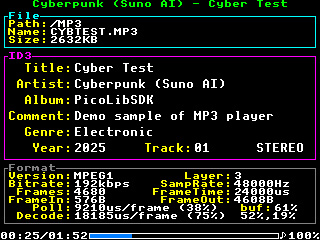
There are 2 lines at the bottom of the info page serving for debugging information. 'Poll' shows the time it took to load one frame from the SD card. The entry must be lower than the 'FrameTime' entry, otherwise there is a risk of audio dropout. The 'Decode' entry similarly shows the time required to decode one frame. The value must again be lower than the 'FrameTime'. The 'buf' entry displays three values - input buffer filling when reading a frame, input buffer filling when decoding a frame, and output buffer filling when decoding a frame. If the values are low, there is a risk of audio dropout.
The MP3 player application comes in two versions. The basic variant MP3.UF2 plays music in MONO on the Picopad's internal speaker. The MP3_GP01.UF2 variant plays music in STEREO to the output pins GPIO0 and GPIO1 (Ext connector of the Picopad). The following wiring is recommended to use:
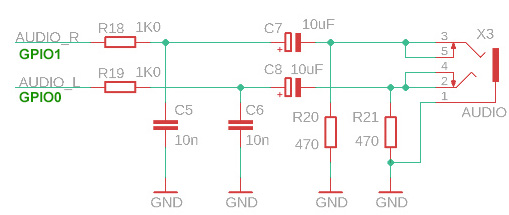
Audio output is via 12-bit PWM with a sampling rate of 123 kHz. Noise and interference may be audible on some devices in the background - signals from the SD card and voltage converter may be induced into the audio.
>>> Demo video on YouTube <<<
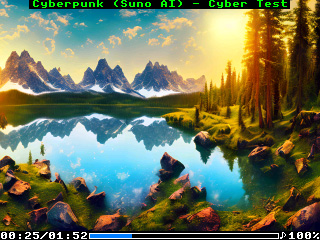
The player comes with a sample set of songs, in the style of various artists, created in Suno AI. In total, there are 248 tracks, containing 13 hours of music. Samples can be downloaded here.
Download samples part 1 (200 MB): styles of ABBA, The Beatles, Breton Celtic, Classical
Download samples part 2 (224 MB): styles of Computer, Cyberpunk, Enya, Folk
Download samples part 3 (213 MB): styles of Children, Jean-Michel Jarre, J-pop
Download samples part 4 (217 MB): styles of Loreena McKennitt, Medieval, Meditation, Metal, Vox Angeli
Download samples part 5 (207 MB): styles of Mixed, Nightwish with Tarja Turunen, Mike Oldfield
Download program: Picopad1, Picopad2, Picopad2riscv.
Source codes of MP3 library, source codes of MP3 player.
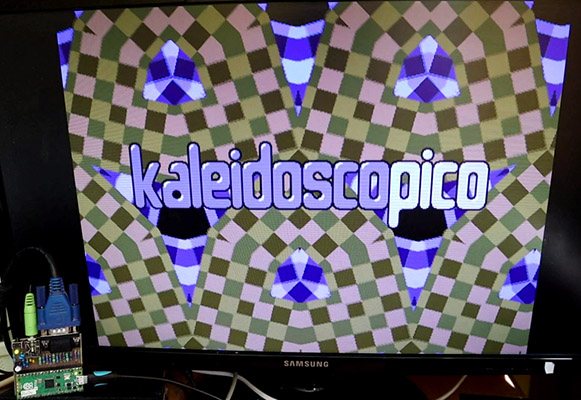
This project has nothing to do with the PicoLibSDK library, and I am not even its author. The author is the brilliant musician and programmer Linus Akesson from Sweden. It is a prime example of what a skilled programmer can achieve with the Raspberry Pico 2 module. However, only programmers who know how extremely difficult it is to achieve something like this will truly appreciate it. By the way, I definitely wouldn't be able to create this. It is a graphics and music demo, with output to a VGA monitor at a resolution of 1024x768/60Hz. The processor runs at a frequency of only 130 MHz (!). The program consists of 17000 rows of RISC-V assembler and uses all the capabilities of the RP2350 processor to the extreme. The resulting animation is so amazing that I had to build the Kaleidoscopico module to see it with my own eyes.
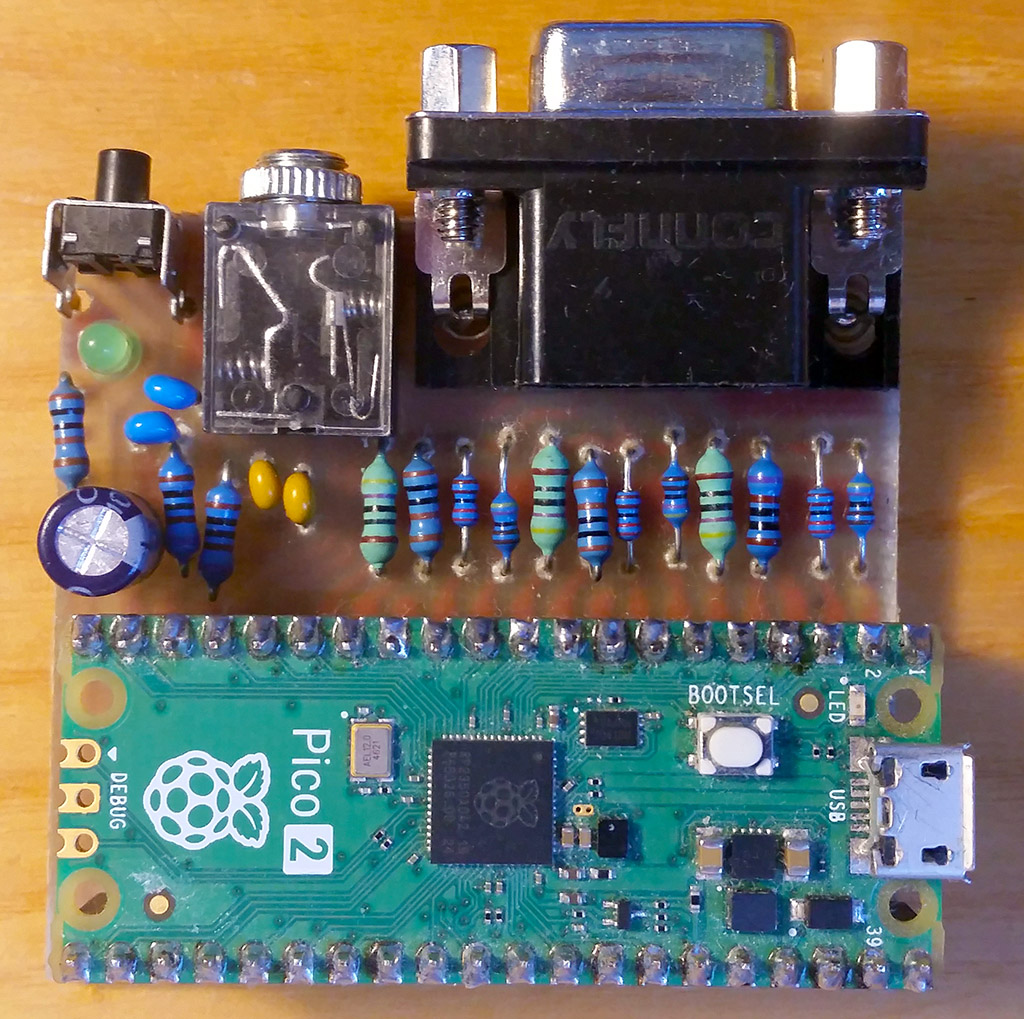
The wiring diagram is simple and can also be implemented on a breadboard. I made a printed circuit board because I wanted the device to be compact. The resistors for VGA should have higher precision, but the image quality will not suffer much if you use values close to mine - 470, 1K0, 2K2, and 4K7.
I recorded the demo - intentionally with a camera and just in my hand, for authenticity, so you can better see what the demo looks like in reality and that everything is actually generated programmatically in real time: https://www.youtube.com/watch?v=XT4kAaerATs
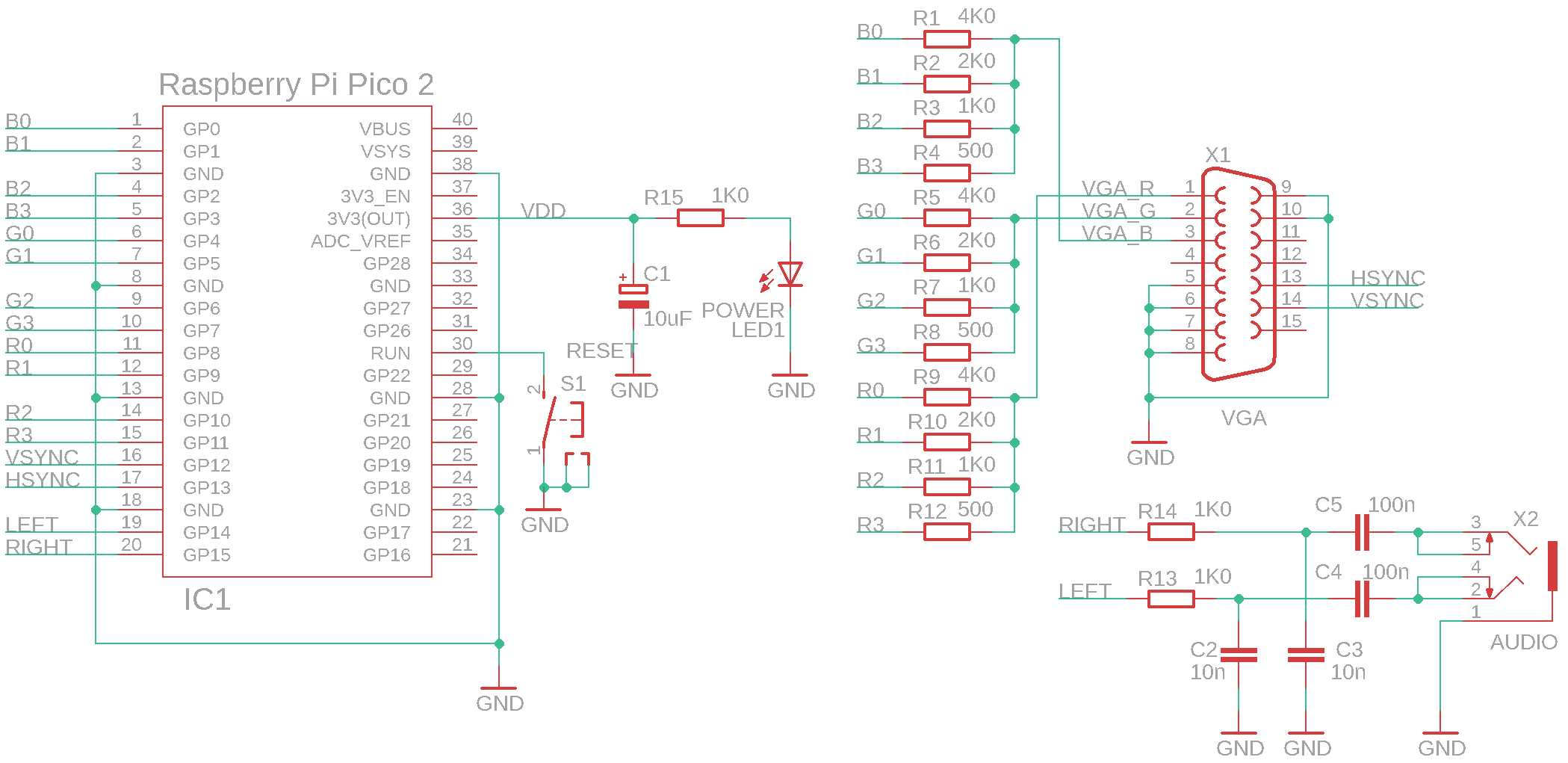
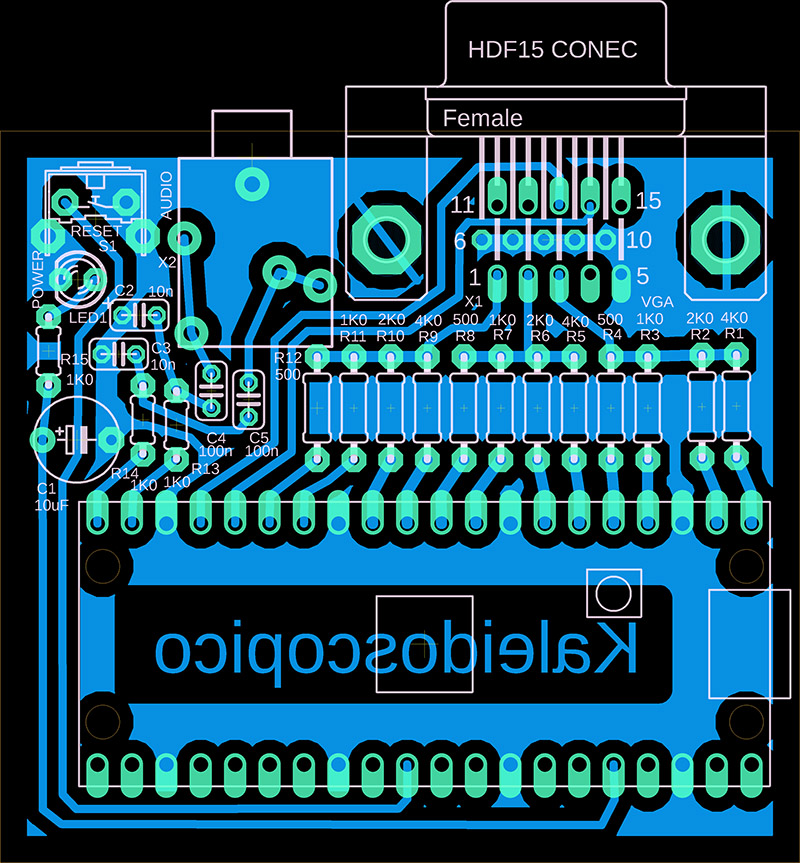
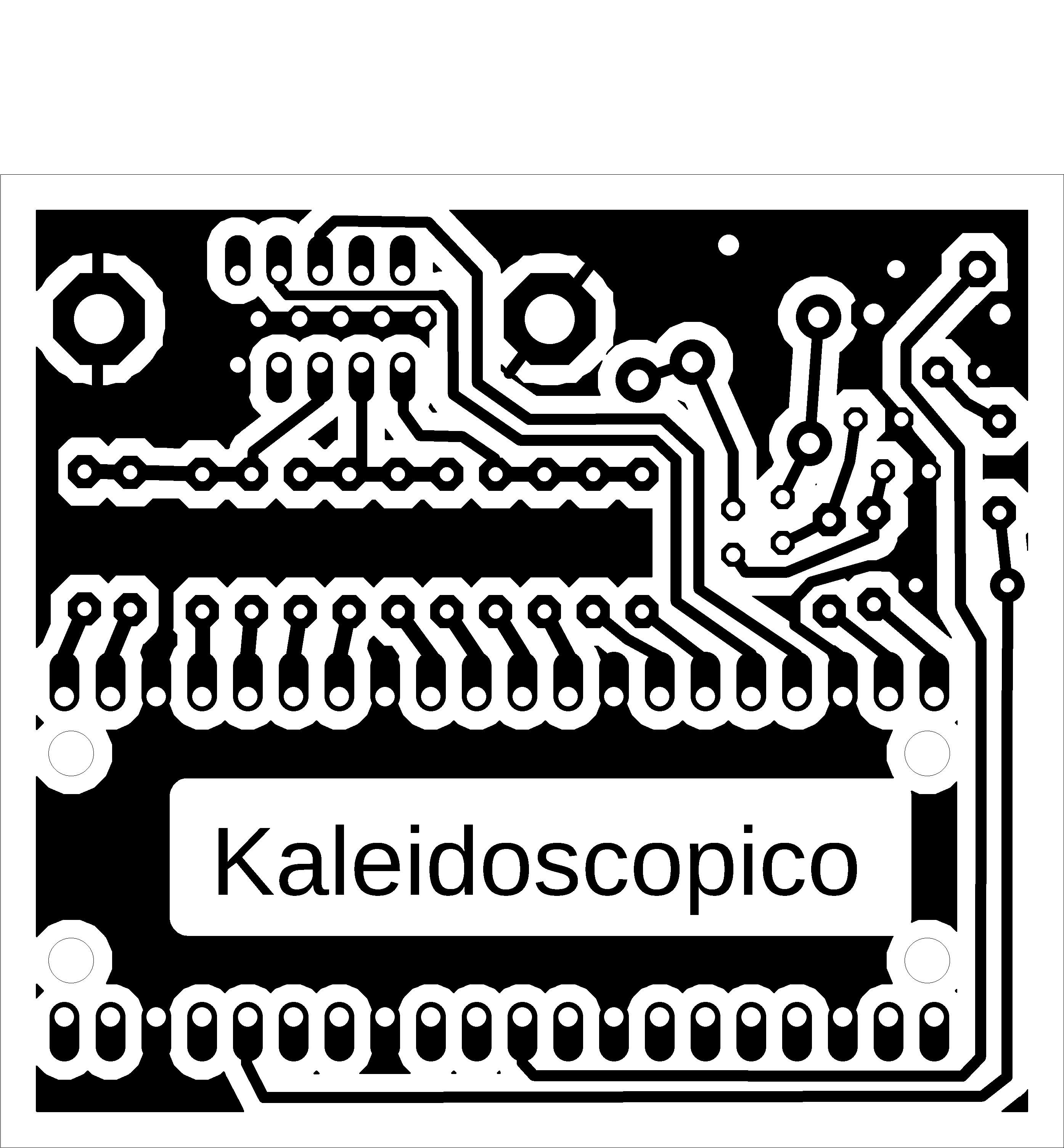
Download documents - schematic and PCB in Eagle, firmware in UF2 and BIN formats
Author's website with the Kaleidoscopico project
Author's demo video of Kaleidoscopico
My recording with Kaleodoscopico
A similar demo, Craft, also created by Linus Akesson, which I previously implemented.
03/08/2023 PicoPad prototype with pre-alpha PicoLibSDK version 0.8.
04/28/2023 PicoPad full version with alpha PicoLibSDK version 0.90
06/28/2023 alpha PicoLibSDK version 0.91, improved battery measurement
07/30/2023 version 1.00: first final release
08/06/2023 version 1.01: printf() print memory block, stdio to UART and FILE, add Pico and PicoinoMini devices, some USB repairs
08/14/2023 version 1.02: added video player, added DemoVGA board, added compilation scripts for Linux
08/19/2023 version 1.03: SPI SD card speed fix, timer-alarm treatment for short times
08/26/2023 version 1.04: Replace qvga/vga/qdraw/drawtft libraries with more versatile minivga/draw libraries with 4/8/15/16 bit output and 320x240 to 800x600 pixel resolution. Slide-show player added. Added Picotron device, with 4-bit VGA output. Added BOOTSEL to boot3 loader (in Battery menu).
09/09/2023 version 1.05: CSYNC in VGA driver, added PicoVGA8 library, added VREG library, setup volume and backlight, calibrate crystal.
10/03/2023 version 1.06: added PicoPadVGA device and some drawing functions.
10/06/2023 version 1.07: support for RAM programs, support for saving and loading Flash boot loader.
10/18/2023 version 1.08: simulate keypad using USB keyboard (USE_USBPAD, A->Ctrl, B->Alt, X->Shift, Y->Esc).
12/05/2023 version 1.09: ADPCM sound compression, original-SDK interface.
12/30/2023 version 1.10: Intel 4004/4040 CPU emulator, DVI (HDMI) display, DVIVGA (HDMI with VGA) display, file selector
01/27/2024 version 1.11: loader passes home path to the application; CPU emulators: I4004, I4040, I8008, I8048, I8052, I8080, I8085, I8086, I8088, I80186, I80188, M6502, M65C02, X80, Z80.
05/01/2024 version 1.12: Screen saver in loader to turn off when charging. Simple PC DOS emulator.
06/14/2024 version 1.13: Game Boy Emulator
10/08/2024 version 2.00: RP2350 Pico 2 support
10/27/2024 version 2.01: Fast float library for RISC-V Hazard3 core.
11/05/2024 version 2.02: NES Emulator
12/03/2024 version 2.03: Fast double library for RISC-V Hazard3 core.
02/24/2025 version 2.04: DispHSTX library v1.00, DrawCan library, faster compilation, configurable compilation paths
03/02/2025 version 2.05: Build of DispHSTX v1.01 library for Raspberry PicoSDK
03/05/2025 version 2.06: PWMSnd update - higher quality audio output, less noise, higher PWM output sample rate, 12-bit output, stereo and 16-bit format support
03/14/2025 version 2.07: MP3 decoder and player
05/01/2025 version 2.08: Added PicopadHSTX device and DispHSTXMini driver
05/07/2025 version 2.09: PSRAM memory support, PSRAM memory allocator
Miroslav Nemecek


